Edit real content
Text, images and pages change through the block editor — with patterns that keep new content on-brand automatically.
Design & Build
Custom-built WordPress from a studio that treats it as an operating decision: your team edits and publishes at will, and the build stays fast because it was never a plugin pile.
Choose WordPress for one reason: you want to operate your own site — write, edit, publish, without asking anyone.
That is the honest case for it. Roughly forty percent of the web runs on WordPress because owners want the keys. Our job is to hand you the keys to something fast, safe and pleasant to drive — not to a hoarder’s garage of plugins.
The whole point, in one picture
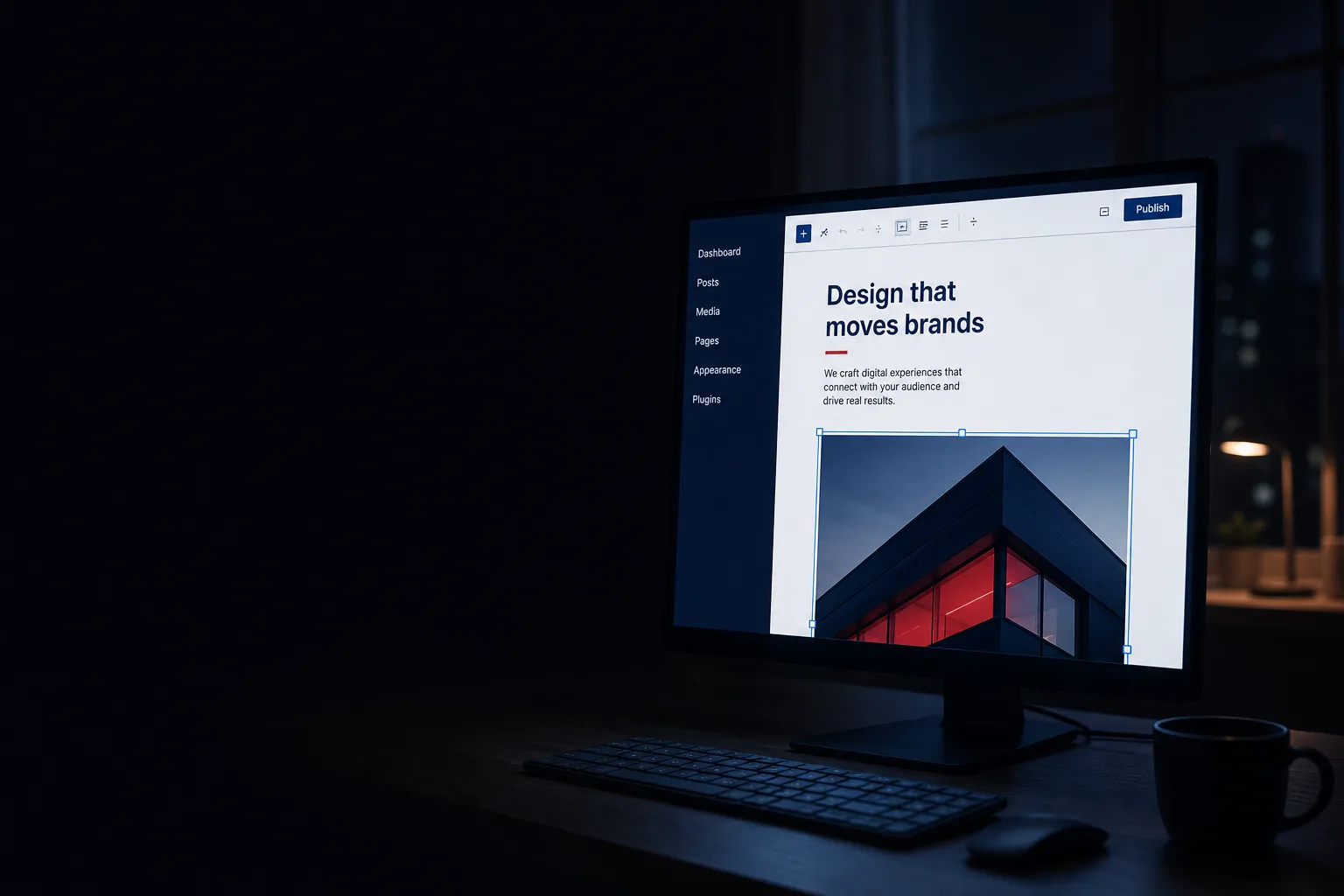
Your team opens the editor, changes the words, presses Update — and the styled page is live. No developer, no ticket, no waiting.
The editor on the left is what working in WordPress actually looks like — a sidebar, your content in blocks, one Update button. The page on the right is what your customers see seconds later, already styled to your brand.
The publishing flow
Your team works in the block editor — text, images, pages, products — inside guardrails we design so layouts cannot be accidentally dismantled.
See the exact page at desktop and phone widths before anyone else does.
Optional but wise for teams: authors write, an editor approves. WordPress roles enforce it.
One click. Schedule it for Monday morning if you prefer — the site does not need you awake.
The styled page, on your domain, seconds later. Undo exists: every revision is kept.
The build philosophy
What your team gets to run
Text, images and pages change through the block editor — with patterns that keep new content on-brand automatically.
Prebuilt patterns for the page types you actually publish, so a new service page matches the rest without design work.
Upload and swap images with sizing and compression handled, so nothing breaks the layout or the load time.
Admins, editors, authors — real roles, so the new hire can write posts without being able to delete the homepage.
WooCommerce drops into the same admin when a store is part of the plan — one login, products beside pages.
Analytics and search tooling wired in from launch, not bolted on when someone finally asks for numbers.
Two good ways to run it
You run it (self-managed)
We run it (managed)
Your site. Your choice of hands on it.
If being able to log in and change your own pages, posts and products whenever you want matters to you, WordPress is often the right choice. And if you would rather never touch an admin screen, we handle routine content changes on managed builds quickly — generally within one business day. Either way, the domain, the content and the site are yours.
The knowledge base
The honest version — including the questions agencies prefer you did not ask.
Choose WordPress when you want to own and operate the site rather than rent it. Site builders are genuinely easier to start with, but you are a tenant: your site lives on their platform, at their monthly price, within their limits, and you cannot take it with you. WordPress is open-source software running on hosting you control — you can change hosts, change developers, extend it in any direction, and nobody can raise the rent on your own website.
The honest trade: WordPress needs discipline (updates, backups, a sane plugin list) that builders handle for you. Our builds and care plans exist precisely to give you ownership without the homework.
Three common cases. If your site will rarely change — a brochure that gets touched twice a year — a hand-built static site is faster, cheaper to run and has nothing to maintain. If your entire business is the store and you want operations maximally handled, Shopify’s hosted model can beat WooCommerce’s flexibility. And if you need a genuine web application — accounts, dashboards, complex logic — WordPress can be bent that way, but bending it is usually the expensive path. We will tell you which case you are in on the first call, even when the answer is not WordPress.
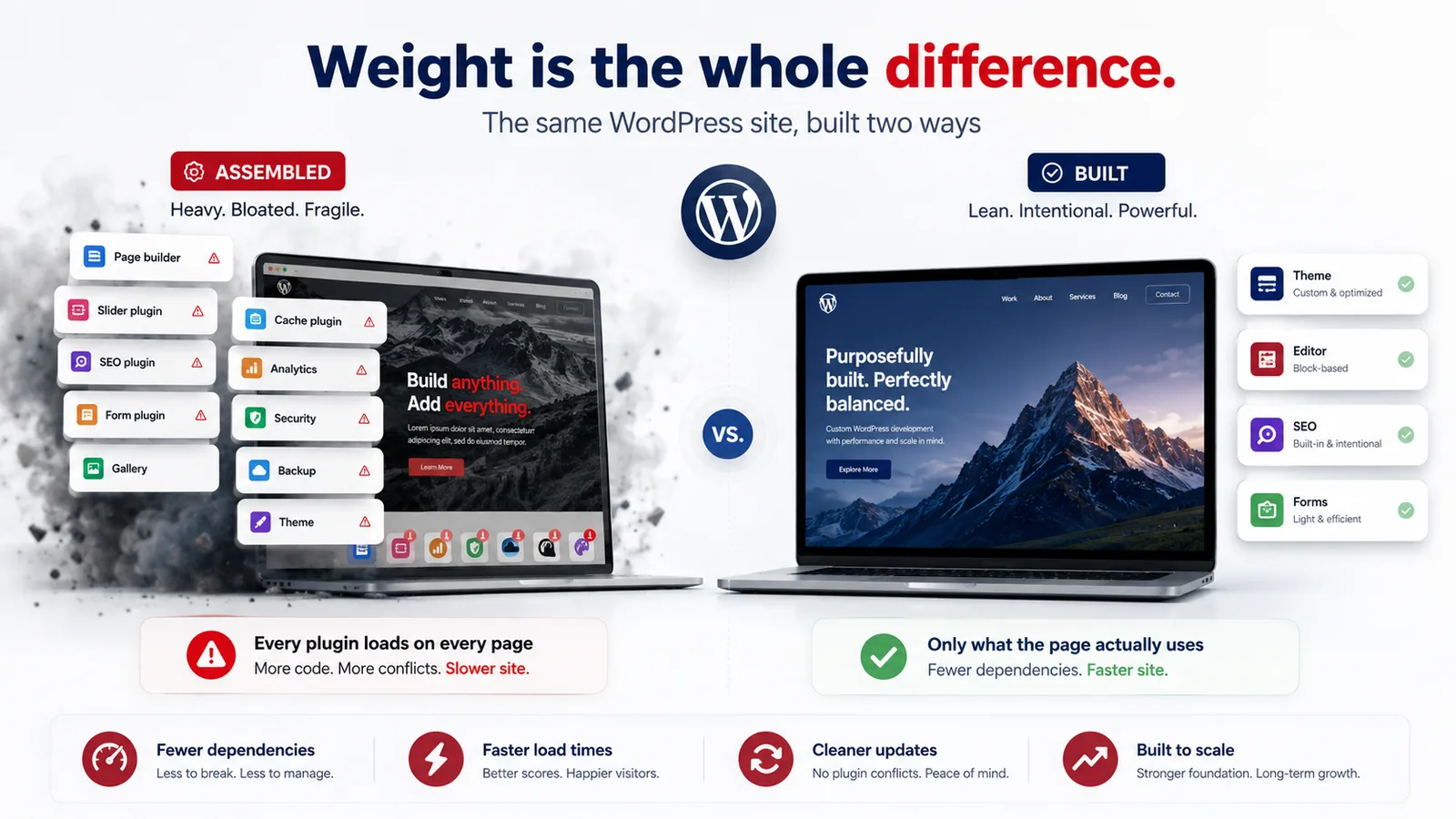
No — but the way many sites use it is. The platform powers roughly forty percent of the web and is actively developed; the block editor, modern themes and modern PHP have little in common with the WordPress of 2015. What ages badly is a specific build style: a purchased mega-theme, a page builder on top, and thirty plugins patching gaps. That is the thing people are remembering when they call WordPress slow or fragile. A custom theme with a short plugin list is none of those things.
Generally no. Page builders make the first week fast and every week after slower: they load their own framework on every page, lock your content into their markup, and produce sites that are hard to maintain and migrate. We build custom block themes instead — your team gets genuine visual editing through the native block editor, with patterns that keep everything on-brand, and the pages stay light. The exception: if you arrive with an existing builder site and a small budget, we will say honestly whether tidying it beats rebuilding it.
Genuinely easy for content: if you can use a document editor, you can edit a page, swap an image, write a post. Where non-technical users get into trouble is layout — which is why our builds constrain it. You edit within designed patterns; the spacing, colours and type are locked to the design system. The result is the sweet spot: your team changes anything that is content, and cannot break anything that is design. Every handover ends with a screen-share walkthrough, and we record it so new staff can watch it later.
Yes — this is one of WordPress’s quiet strengths. Administrators manage everything; editors publish and approve; authors write but only manage their own drafts; contributors need approval to publish at all. Practically: the owner keeps admin, the marketing person gets editor, the junior writes as an author, and nobody can install a plugin or delete the homepage by accident. We set the roles up as part of the build and document who holds what.
The software is free; the honest running costs are hosting (roughly $10–$50 a month for most business sites — more for heavy commerce), your domain (about $20 a year), and any premium plugin licences the build genuinely needs (often zero, sometimes one or two, typically tens of dollars a year each). Add our optional care plan if you want updates, backups and monitoring handled. What it does not cost is a platform fee — there is no rent on the software itself, which over a few years is a meaningful difference from builder subscriptions.
Someone must, deliberately. On managed builds we run automated offsite backups on a schedule matched to how often the site changes — daily for busy sites — and we test restores, because a backup nobody has restored is a hope, not a backup. On self-managed builds we configure the backup system before handover and show you how to check it. Good hosting adds its own layer. The rule is that a backup should exist in a second location and someone should know, not guess, that it works.
The software itself is actively maintained and patched quickly; the honest risk profile comes from its popularity and its ecosystem. Because WordPress is everywhere, automated attacks probe every WordPress site constantly — and what they find on compromised sites is almost always the same: outdated plugins, abandoned themes, weak passwords, no update discipline. Security is therefore mostly an operations problem, and a very solvable one: a short list of well-maintained plugins, prompt updates, strong authentication, sensible hosting, and backups for the worst case. Our builds ship that way, and managed clients keep it that way without thinking about it. No honest studio calls any platform unhackable — but a disciplined WordPress site is a hard target, and an unmaintained one is an easy one. The discipline is the product.
They are slow because of what got piled on: mega-themes that load everything everywhere, page builders with their own frameworks, a dozen plugins each adding scripts to every page, and unoptimised images. None of that is the platform’s fault. Our builds are custom themes that load only what each page uses, images sized and compressed properly, and a plugin list you can count on one hand — tested against Core Web Vitals on real devices. Fast WordPress is not a contradiction; it is just a decision made at build time instead of an apology made later.
Core, theme and plugin updates arrive continuously. The safe routine is: update promptly, on a schedule, with a current backup, then check the site. On managed builds we do that for you and you never think about it. On self-managed builds we configure safe auto-updates where appropriate and hand you a fifteen-minute monthly routine in plain English. What actually breaks sites is skipping the routine for a year and then updating everything at once into the unknown — the one habit we ask self-managed clients not to develop.
Yes — WooCommerce turns WordPress into a full store inside the same admin, and it is the right choice when you want content and commerce in one place with no platform fee and full ownership of the stack. It is real software you own, which also means hosting and updates matter more than on a hosted platform. Whether Woo or Shopify fits your catalogue and operations better is an honest first-call conversation — we build both, and the comparison lives on our E-Commerce page.
Yes, and the order of operations matters more than people expect. We inventory your current pages and which ones actually earn traffic, migrate the content that is worth keeping, set up redirects for every URL that changes, and launch with the search engines seeing an upgrade rather than a disruption. Builders like Wix and Squarespace do not export cleanly, so content is moved deliberately rather than through a magic importer — which is also the moment to fix structure and copy rather than shipping the old site’s problems to a new address.
Often, yes. If the structure and content are sound, removing plugin bloat, rebuilding the theme and setting up proper maintenance beats starting over — and costs less. We audit what exists, tell you which of the three honest verdicts applies (tidy it, partially rebuild it, or replace it), and show you why. What we will not do is patch a fundamentally broken build and put our name on it.
You keep everything, because you already own everything: domain, hosting account, database, theme code, content. The theme is standard WordPress — documented, no proprietary framework, no licence that dies with us — so any competent WordPress developer can pick it up the same week. We would rather be kept because the work is good than because leaving is engineered to hurt.
You do. Hosting and domain sit in accounts registered to you. Content and images are yours. The custom theme is built for you and handed over. Where a premium plugin licence exists, it is purchased in your name so it survives any change of developer. The test we build to: if 3 Lions vanished tomorrow, your site would not notice.
Tell us how you want to work — hands on the keys or hands off entirely — and we’ll show you the build that fits.