


Product businesses that want it handled
- Hosting, security and updates handled for you
- Strongest checkout of the three out of the box
- Huge app store when you need something extra
You pay monthly, plus per-app fees that add up quietly.
Design & Build
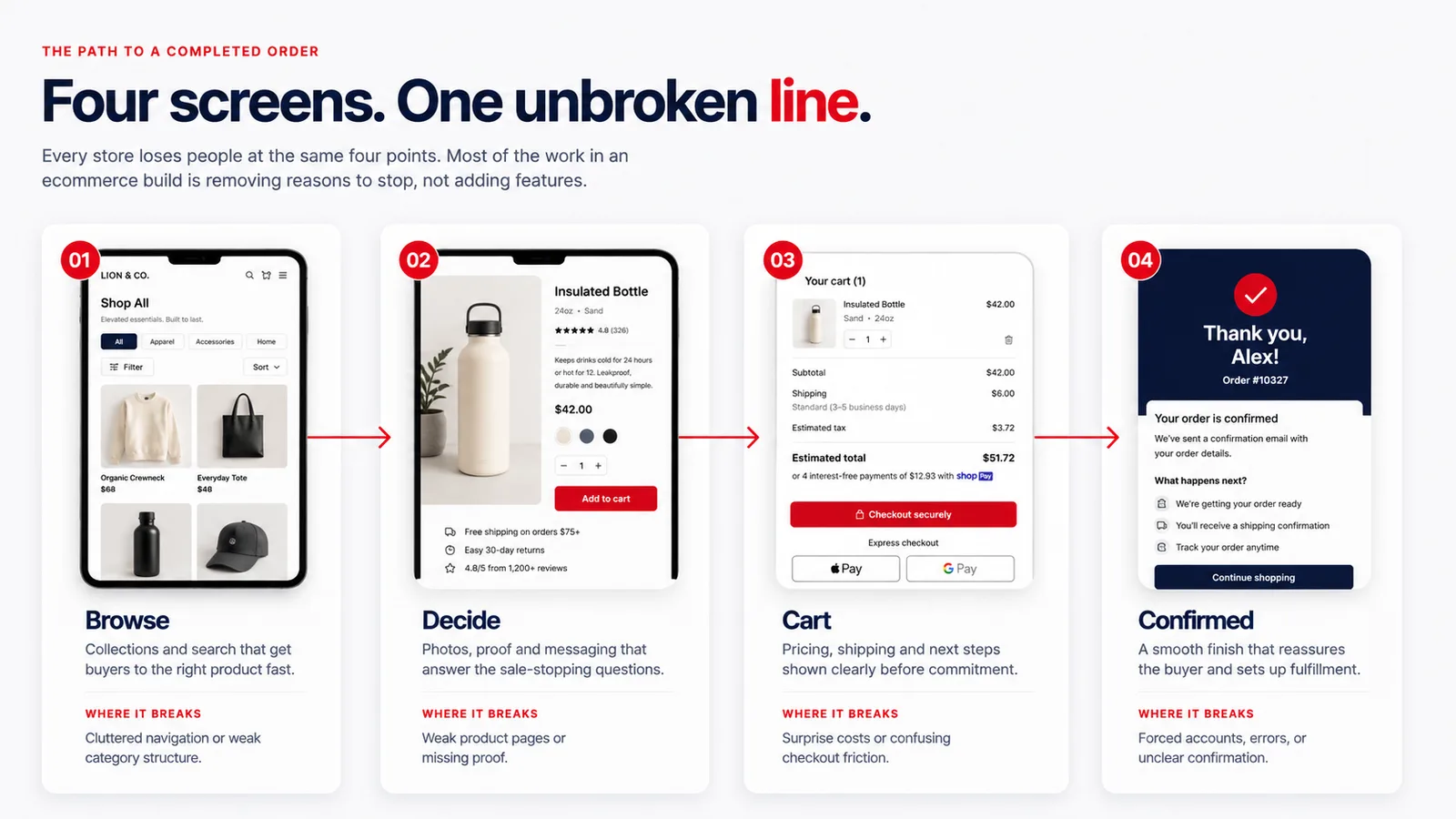
Shopify and WooCommerce storefronts built around product discovery, mobile buyers, honest shipping maths and a checkout that gets out of the way.
Where stores win and lose
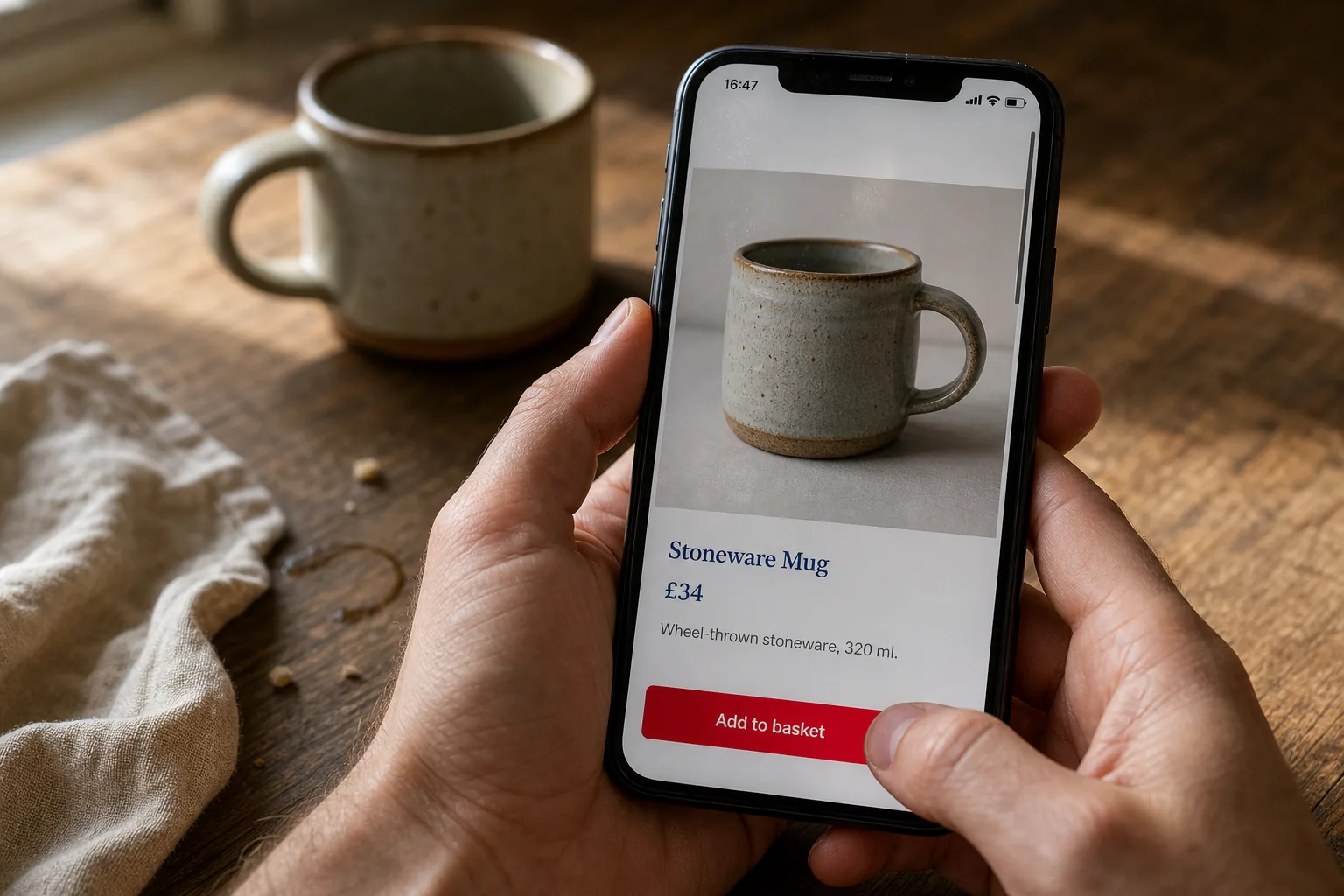
How fast a product page loads. Whether someone can find the thing they half-remember. How many taps sit between wanting it and having bought it. Those details are the whole margin.
Most of your buyers are on a phone, deciding in seconds whether to keep looking or leave. We build the store around that reality rather than around what looks good on a designer’s monitor.
Choosing a platform
There is no best platform, only a best fit for your catalogue, your budget and who has to run it on Monday morning.
Product businesses that want it handled
You pay monthly, plus per-app fees that add up quietly.

Teams already running a WordPress site
You own the hosting, backups and updates — real work.

Small-batch sellers just starting out
You rent the audience — fees per sale, and buyers are theirs.
We will tell you honestly which one suits you on the first call — including when the answer is to stay where you are and just fix the storefront you have.
What goes into the build
Collections, categories, variants and options structured so the catalogue makes sense to buyers and to search engines.
Photos, specs, sizing, shipping answers and reviews arranged to kill the objection that stops the sale.
Designed phone-first and tested on real devices, because that is where most of your buyers are.
Fewer steps, guest checkout, wallets like Apple Pay and Shop Pay — nothing that makes a buyer stop and reconsider.
Live rates, sensible zones, and tax collection configured per region you sell into — surfaced early, not sprung at the end.
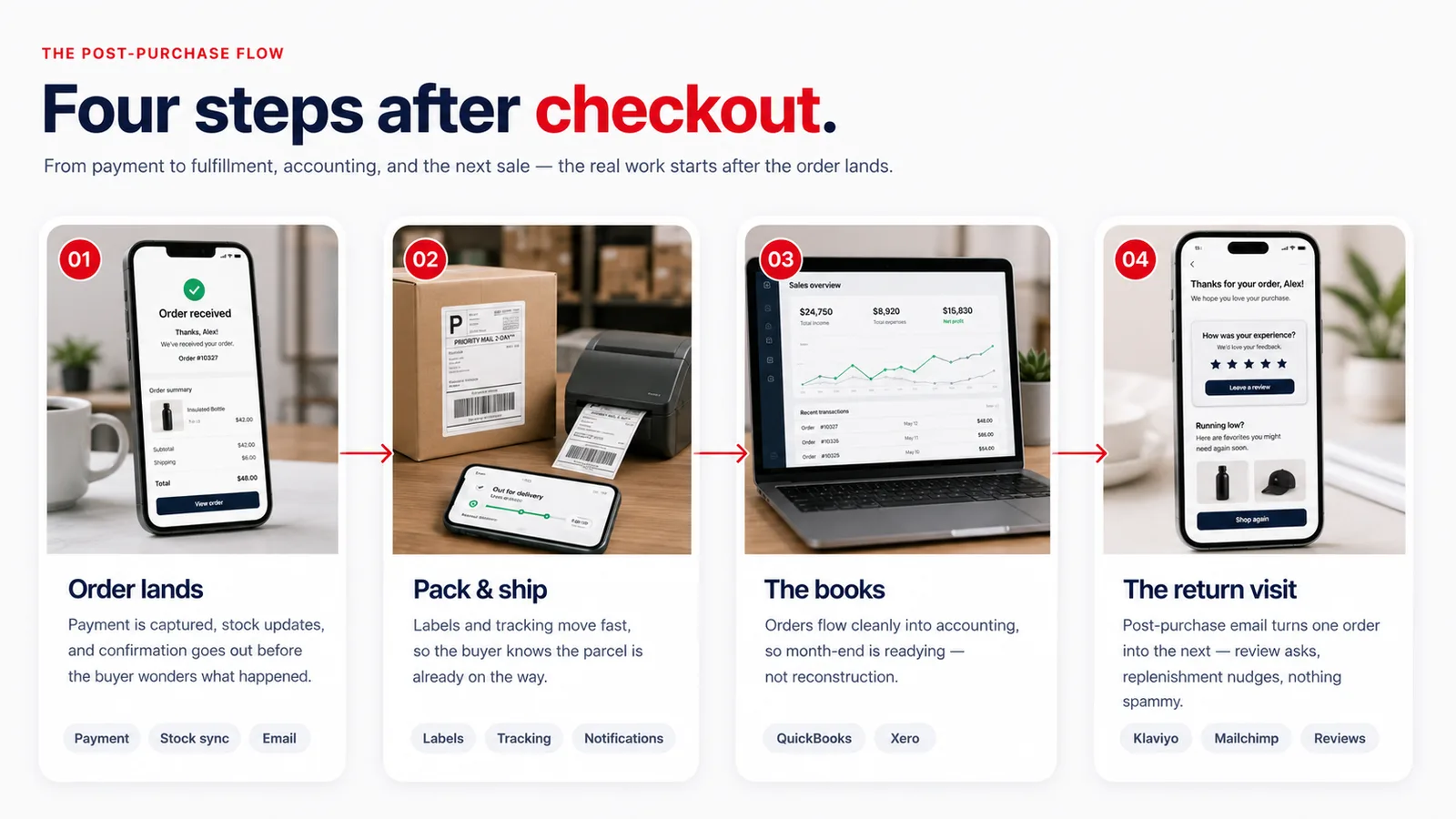
Stock that stays true across your store, Etsy and anywhere else you sell, so you never sell what you do not have.
Klaviyo or Mailchimp connected properly: abandoned-cart flows, post-purchase sequences, and a list you own.
Tracking set up so you can see where buyers leave and what marketing pays — not a dashboard nobody opens.
Product imagery and copy produced or reworked to standard — the store is only ever as good as what is on the shelf.
Whatever you sell — wherever you sell it.
Shopify, WooCommerce, Etsy, or something built from scratch when none of them fit. Wired to the payment, shipping, accounting and email tools you already run. We build for businesses across the English-speaking world, so selling into more than one country is a normal requirement here — not a surcharge.
The knowledge base
Platform choices, money, shipping, migration — answered the way we would across a table.
Decide on operations, not features — both platforms can run an excellent store. Shopify is hosted: security, uptime, updates and checkout are Shopify’s problem, you pay monthly for that peace, and per-app fees accumulate. It suits owners who want the store handled. WooCommerce is software you own inside WordPress: no platform rent, total freedom, content and commerce in one admin — and hosting, backups and updates become your responsibility (or our managed plan’s). It suits teams already living in WordPress or anyone allergic to platform fees.
The deciding questions are usually: who maintains it on Monday, how custom does the buying experience need to be, and does a content-heavy site sit beside the store? We build both and have no commission pushing either.
As a second channel, often yes — Etsy brings buyers who are already searching for what you make, which your own store has to earn. As the only channel, it is risky: fees per sale, limited branding, and the customer relationship belongs to Etsy, not you. The pattern that works for most makers: keep Etsy for discovery, run your own store for margin and repeat customers, and keep stock synced so the two never fight. We set that dual arrangement up routinely.
Yes — products, variants, customers, order history and search visibility. The dangerous part of a store migration is not the data; it is the URLs and the details: product pages that rank, reviews attached to products, gift-card balances, subscription billing. We map all of it before anything moves, put redirects in place for every address that changes, and time the cutover so the store never stops taking orders. Done properly, a migration reads to Google as an upgrade, not a reset.
Audit first, always. If traffic arrives and dies on the product page, the fix is usually photography, copy and page speed — weeks of targeted work, not a rebuild. If carts fill and checkouts die, it is almost always surprise costs, forced accounts or a hostile mobile form. A rebuild is justified when the platform itself is wrong, the theme is unmaintainable, or mobile is unsalvageable. We will tell you which case you are in, with the evidence, before proposing anything.
Cards through a mainstream gateway (Stripe, Shopify Payments, PayPal, Square), plus the one-tap wallets — Apple Pay, Google Pay, Shop Pay. The wallets matter more than most owners expect: on a phone, they collapse the entire card-and-address form into a thumbprint, which is exactly where hesitant buyers bail. PayPal is worth keeping for the segment that simply trusts it. Beyond that, follow your market rather than collecting logos — every extra option adds a maintenance surface.
Three honest models. Flat rates: simplest, predictable, works when your parcels are consistent — you accept winning some and losing some. Live carrier rates: the platform quotes the courier in real time — accurate, but exposes expensive corners of the map. Free shipping over a threshold: the strongest converter, priced into margins, and it nudges order size up. Most stores end up with a hybrid, and the real discipline is showing the cost early — at the cart, not the final step. Surprise shipping is the single biggest cart killer in commerce; we design so it cannot be a surprise.
The platforms are genuinely good at this now: Shopify and WooCommerce both calculate location-based tax — Canadian GST/HST/PST, US state taxes, UK and EU VAT — once configured for the regions you actually sell into. We do that configuration as part of the build, and we set up multi-currency display where it helps. The honest boundary: we configure the machinery, and your accountant confirms what you must register for and remit where — that part is tax advice, and pretending otherwise would be doing you a disservice.
Beyond the build: Shopify starts around $50 a month plus payment processing (about 3% each sale) plus any paid apps. WooCommerce has no platform fee but real hosting ($20–$60 for decent commerce hosting) plus processing plus any premium extensions. Email platforms scale with list size. None of this is hidden — we put the expected monthly picture in the proposal so the store’s economics are visible before you commit, not discovered on the first statement.
One source of truth, synced outward. The platform holds the count; Etsy, point-of-sale and anywhere else you sell read from and write back to it, so a sale anywhere decrements everywhere. We configure low-stock alerts so reordering happens before the popular size is gone, and oversell protection so a stampede cannot sell stock you do not have. If you also sell in person, we wire the POS into the same count — the Saturday-market sale and the website sale come out of one number.
Both, when they fit the product. Subscriptions (replenishment, boxes, memberships) run through proven extensions on either platform, handling recurring billing, pauses and card retries. Pre-orders and back-in-stock waitlists are similarly well-trodden. The design work is honesty: subscription terms a customer can understand and cancel without a phone call, and pre-order dates you can actually hit. Churn is managed in the product and the email flow, not in a cancellation maze.
Some abandonment is browsing, and no email fixes that. The recoverable kind is interrupted intent — and the fix is one respectful, well-timed reminder sequence: the first within hours while intent is warm, perhaps one follow-up, occasionally an incentive on the second touch (never the first, or you train discounting). We wire this through Klaviyo or the platform natively. More important than recovery is prevention: show shipping early, keep guest checkout, keep the form short. The best abandoned-cart strategy is a cart nobody needs to abandon.
Five numbers run most small stores: sessions, conversion rate, average order value, where orders come from, and which products move. We set the analytics up so those five are visible in one view, wired to real events (not just page views), with marketing attribution honest enough to tell you whether the ad spend pays. Everything deeper — cohort behaviour, repeat rate, margin per channel — is available when a real question demands it. What we do not do is hand you a 40-widget dashboard that answers nothing.
On a screen, the photo is the product — the buyer cannot touch, lift or try it, so the image carries the entire burden of desire and trust. It is the highest-leverage money in commerce: consistent, well-lit, honest photography raises the perceived value of everything it touches, including the price you can charge. You do not necessarily need a studio: we art-direct what you can capture, rework and grade what exists, and tell you honestly when a proper shoot would pay for itself. A store with superb photos and a plain theme outsells the reverse every time.
We do, from your knowledge — interviews, spec sheets, whatever exists — written to answer what buyers actually ask: will it fit, what is it made of, how do I care for it, when will it arrive. Good product copy is buyer-question copy, not adjectives. It also happens to be exactly what search engines and answer engines index, so each product page becomes a small landing page in its own right. You review for accuracy; we handle voice and structure so five hundred products still sound like one brand.
The build itself is usually a few weeks; the honest long pole is product data — photography, descriptions, prices, variants, shipping weights. A ten-product store with material ready moves fast. A four-hundred-product catalogue that needs photographing is a bigger project, and we will say so on day one rather than let it surprise everyone in week three. We scope launch as: full build quality, your real catalogue, plus the wiring — payments, shipping, tax, email — tested end-to-end with real transactions before the public sees it.
If you want us to. Some owners take the keys and run everything; some keep us for seasonal changes, new collections and campaign landing pages; some put the whole store under managed care — updates, monitoring, content changes generally live within one business day. All three are normal. Whichever you choose, the store, the data and every account are yours, so the arrangement is a service, never a hostage situation.
Tell us what you sell and how you sell it — we’ll show you how the store would come together, platform and all.